Credentials and rights
The four kinds of credential Acclimate issues, the three rights a machine token can carry, what needs a signed-in person and how a new member joins a workspace.
Every request to the service carries a credential. This page says which kind to give an application, a script or an executor, and how an invited member connects an application.
Credential types
| Credential | Who issues it and where | What it can do |
|---|---|---|
| Connection credential | A workspace administrator, on a connection in Connections, with Create read credential | Resolve that connection's channel and read any version ever released on it, including one later rolled back or blocked. Nothing else. |
| Receipt credential | A workspace administrator, on the same connection, with Create receipt credential | Send delivery receipts for that connection, but not read a bundle |
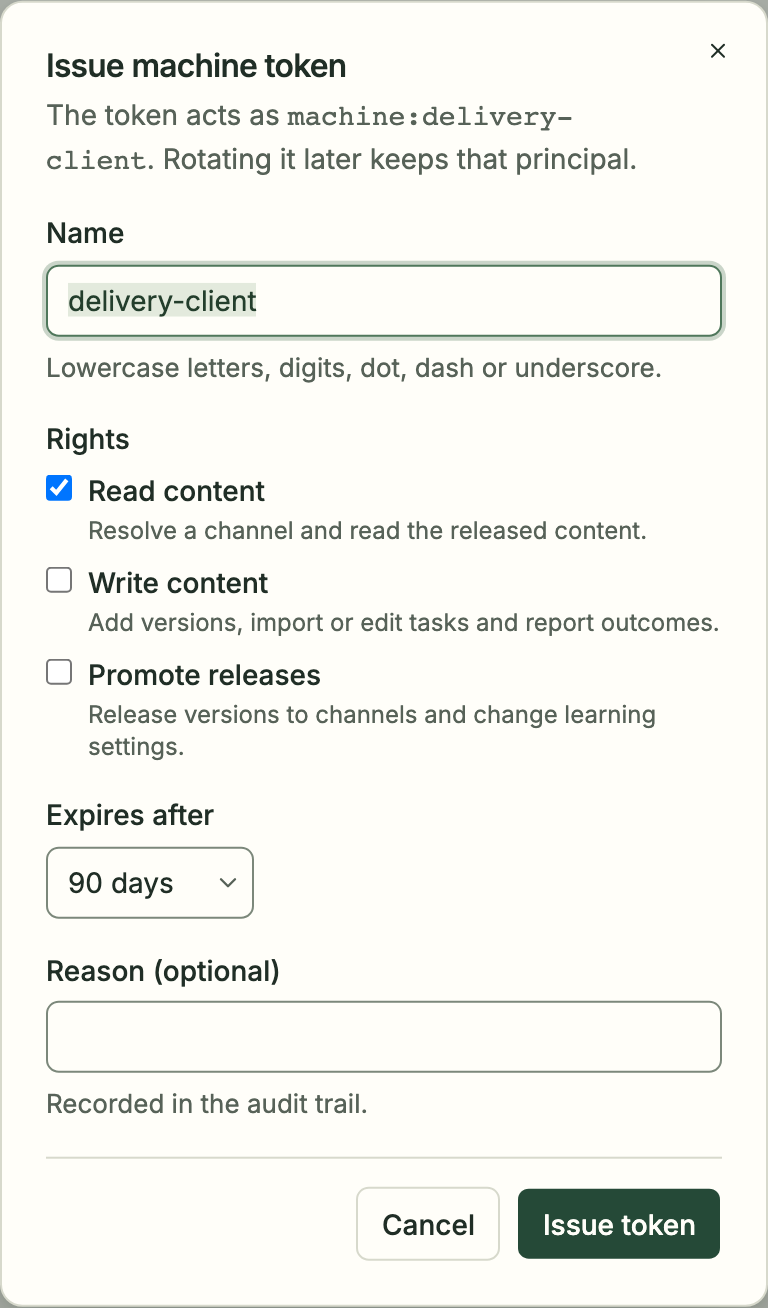
| Machine token | A workspace administrator, on the Machine tokens page, with Issue token | Call the API in one workspace with the rights you tick |
| Static machine token | The operator, in the service's ACCLIMATE_AUTH setting | Call the API with the rights granted in each workspace it names |
| Executor credential | The operator, with acclimate-service --create-executor-token | Let an executor take learning work. It belongs to no workspace. |
Each secret is shown once. Connection and receipt credentials start with aci_, issued machine tokens with acm_, and an executor credential is 64 hex characters. A static machine token is any string the operator chooses. Authentication lists the routes and statuses each credential gets.
Lifetime and revocation
| Credential | Expires | Rotate | Revoke |
|---|---|---|---|
| Connection or receipt credential | Never | Issue a new one, move the application to it, then revoke the old one. | Choose Revoke beside it on the connection, or choose Revoke connection, which disables both kinds. |
| Machine token | After 90 days, or the 1 to 365 days you choose | Rotate issues a successor with the same name and rights, and keeps the old token working for up to one hour. In the API, overlapSeconds sets that from 0 to 604800, and its default of 0 revokes the old token at once. | Choose Revoke… from the token's actions on the Machine tokens page. |
| Static machine token | Never | Add the new token, restart the service, move clients to it, then remove the old one and restart again. | Remove it from ACCLIMATE_AUTH and restart the service. |
| Executor credential | Never | See Rotate the executor credential. | Run acclimate-service --revoke-executor-token <id>. |
Revoking a credential or its connection applies to the very next request, which gets 401. Rotating a revoked or expired machine token gets 409 machine_token_inactive. A workspace holds at most 100 active machine tokens, and issuing or rotating beyond that gets 409 machine_token_limit.
Rights
A machine token carries one or more of three rights: read, write and promote, labelled Read content, Write content and Promote releases in the console. Each stands alone: promote does not include write, and write does not include read.
| To do this | The token needs |
|---|---|
Resolve a channel and prepare a version, with job(), client.prepare() or acclimate pull | read |
Report an outcome with job.expect() | write, and read for the job() call before it |
| Import, create, edit or retire tasks, or run a trial | write |
| Add a version to a bundle | write |
| Publish a new bundle with its first release | write and promote |
| Release a version to a channel | promote |
| Turn on learning or change its settings | promote |
| Start, pause, resume or stop a loop, or roll back a round | promote |
| List, create or revoke connections, or issue or revoke their connection and receipt credentials | write and promote |
| List a connection's delivery receipts, or the latest receipt of each connection | read |
A script that releases a version needs read, write and promote. The support agent example needs read and write, and the ticket triage example all three.
A machine token cannot list, edit, retire or recheck held-out tasks. A task list gives it the evolve tasks and a count of the held-out tasks.
In the console, a member's role takes the place of rights. A Viewer can read, and an Editor can also write, release a version and publish a bundle. Connections, and every learning action that needs promote, need an Administrator.
Some actions need a person signed in to the console, whatever rights a token carries:
- Issue, rotate or revoke a machine token: an Administrator
- Save the model provider: an Administrator
- Confirm held-out tasks: an Editor or an Administrator
- Export held-out tasks: any signed-in member
Join a workspace
A workspace administrator invites you at the email address you sign in with, creates a connection for your bundle and channel, and sends you its connection ID and a connection credential through your team's private secret channel.
-
Open the invitation link, sign in to the console and choose Join workspace. If the invitation stays pending, verify the invited email address with your identity provider.
-
Open Bundles, choose the bundle and inspect its files in Content.
-
Install the SDK in the environment that runs your agent.
-
On the bundle's channel, choose App setup. In your application's private environment, set
ACCLIMATE_URLto the API URL it shows,ACCLIMATE_TOKENto the connection credential andACCLIMATE_CONNECTIONto the connection ID. -
Download the delivery check from App setup and run it with the command shown beside it. It makes no model calls, and prints the resolved version, its digest and the number of files checked.
-
In your application, call the SDK when each job starts, and keep the version ID and digest with the job's result. See Deliver content to jobs.